<- back
# Git Commands To Get Out of a Pickle
Posted on Aug 4, 2026
Recently I've been reading Beej's Guide to Git, and it's changed the way I think about learning computer science.
I've always learned best by diving into tutorials, trying things out, breaking things, and figuring out what went wrong from the error messages. Beej's Guide to Git leans into that same philosophy. Instead of treating Git like a list of commands to memorise, it builds an intuition for how everything fits together. The tone is friendly, the examples are practical.
I've tried to form a collection of Git commands and workflows that have saved me in the past, along with when you would end up using them.
## You committed code but forgot to create a branch
You were working on "main", committed your changes, and then realised this should have been its own feature branch.
Your commit is not tied up to a branch, HEAD just happens to be pointed to by it.
# Create a new branch from your current commit

git switch -c feature/my-feature

# Go back to main

git switch main

# Move main back one commit

git reset --hard HEAD~1
Now your commit only exists on "feature/my-feature", and "main" is back where it was before.
## You pushed directly to "main"
Sometimes muscle memory wins.
Instead of rewriting I prefer to revert the commit.
git revert <commit-hash>
git push

Then cherry-pick the original commit onto my feature branch.

git switch feature/my-feature
git cherry-pick <commit-hash>
## Understanding "git rebase"
The easiest way to think about rebasing is:
"Replay my commits as if I had started from a newer point."
Imagine this history:
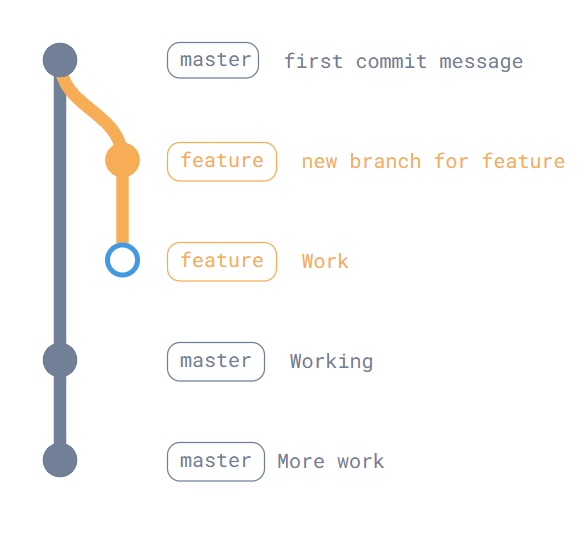
While you were working, "main" advanced:
git switch feature
git rebase main
creates new versions of your commits, The result is a cleaner, linear history that often makes pull requests easier to review.
## Fixing the last commit
Forgot a file?
git add forgotten-file
git commit --amend
Need to change the commit message?
git commit --amend -m "Better commit message"As long as you haven't pushed yet, this is usually the cleanest option.
## Stashing work
Halfway through one task when someone asks you to fix a bug?
git stash

Switch branches.

Fix the bug.

Come back.

git stash pop
If you have multiple stashes:
git stash list
git stash apply stash@{1}
## Undoing mistakes
Undo the last commit but keep the changes staged:

git reset --soft HEAD~1

Undo the last commit and unstage the files:

git reset HEAD~1

Throw everything away and return to the last commit:

git reset --hard HEAD
## Branching workflow
A simple workflow that scales surprisingly well:
main
├── feature/login
├── feature/dashboard
└── bug/navbar- Create a branch for every piece of work.
- Commit often with meaningful messages.
- Rebase onto the latest "main" before opening a PR.
- Open a pull request.
- Merge after review.
- Delete the branch.
Keeping branches focused makes reviews faster and rollbacks easier.
I am yet to work with the new github stacked prs but I feel that this workflow would still be applicable.
## Viewing history
A graph makes Git much easier to reason about.
git log --oneline --graph --decorate --allYou'll get something like:
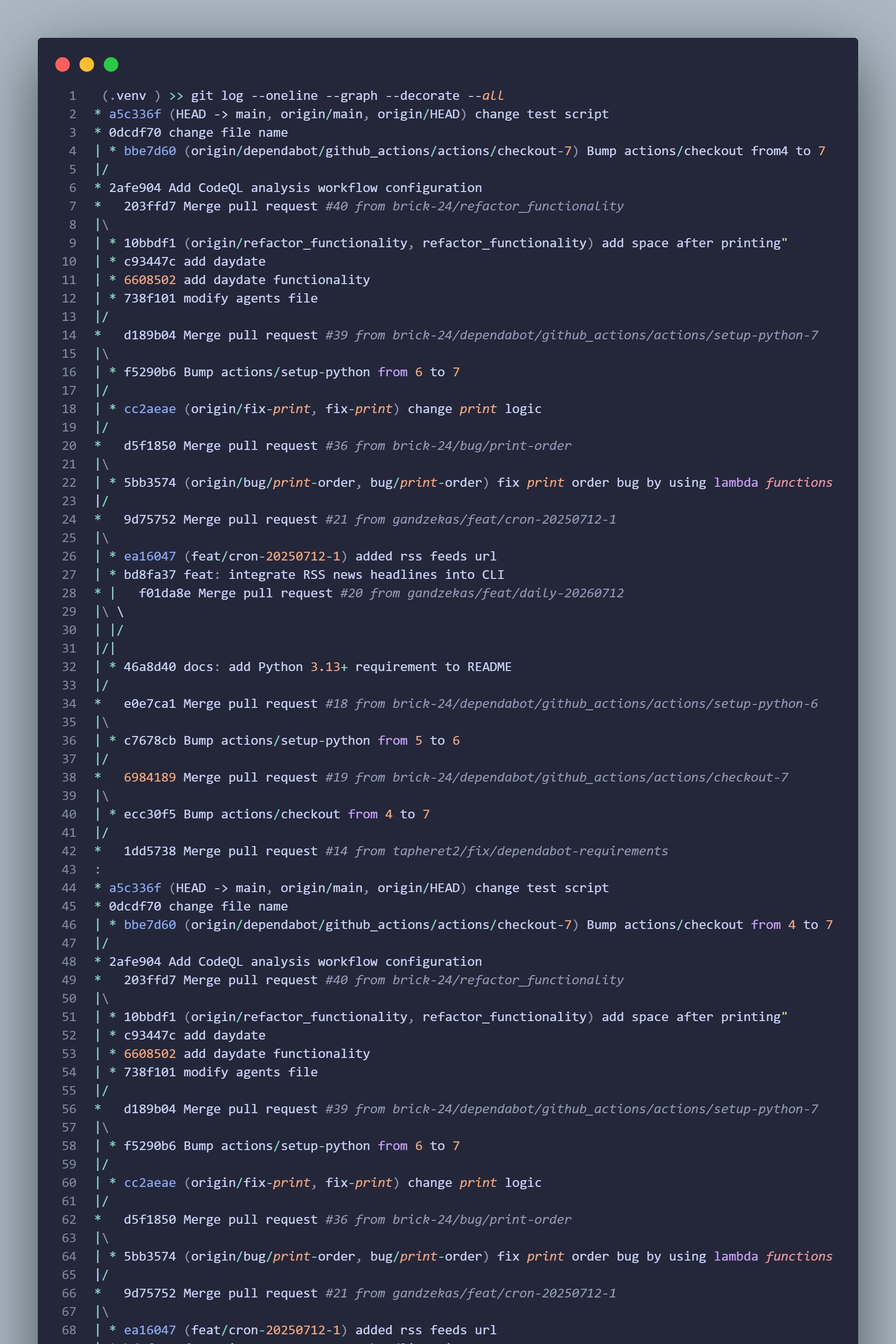
This quickly shows where branches split and merged.
## The commands I use most frequently
git status
git diff
git log --oneline --graph --decorate --all
git switch
git switch -c <branch>
git fetch
git pull --rebase
git stash
git rebase
git cherry-pick
git commit --amend
## The biggest takeaway
Almost every Git command boils down to moving one of three things:
- Your working directory (the files on disk)
- A branch pointer ("main", "feature/login")
- HEAD (where you currently are)
Once you stop thinking of Git as "commands" and start thinking of it as moving pointers around a graph of immutable commits, the commands become much easier to predict instead of memorise.
## Further Reading
Git Explained in 100 Seconds
Learn the basics of Git in 100 seconds. Learn to initialize a git repo, stage files, commit, branch and merge branches
Oh Shit, Git!?!
A practical guide for recovering from common Git mistakes with clear, step-by-step solutions.
Git Fix Up Guide
A comprehensive troubleshooting reference that helps diagnose and recover from complex Git issues.
Dangit, Git!?!
A beginner-friendly collection of fixes for everyday Git problems and accidental mishaps.